AI RAP VIDEO FIELD NOTES
How to make an AI rap video from a photo
Updated October 26, 2026
To make an AI rap video, upload one or two clear photos, pick a stage, write the topic of the rap and press create. On AI Rap Video the AI writes the lyrics (or raps yours), makes the beat and the vocals and animates your face, and a few minutes later you download a 5 to 15-second MP4. A 10-second video at 480p costs 60 credits.
What you need
- One or two clear photos of adults who agreed to appear: you, or you and a friend.
- A topic: a name and one or two details, such as "Mia, cat lover, always late".
- An account with credits. New accounts start with 0 credits; the smallest pack is 60 credits for $9.99, enough for one 10-second video.
- A browser on a phone or computer. There is no app to install.
Step 1: Pick a stage
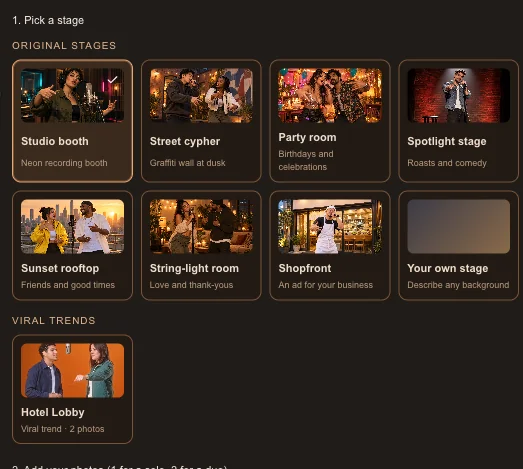
Open the creator on the homepage. The stage decides where the rap happens and what the beat sounds like. Original stages make a new song; Viral trends recreate a popular rap video with your faces.
| Stage | Best for |
|---|---|
| Studio booth | Any topic, with a dark trap beat |
| Street cypher | Old-school flow and storytelling |
| Party room | Birthdays and celebrations |
| Spotlight stage | Friendly roasts and inside jokes |
| Sunset rooftop | Best friends and good news |
| String-light room | Love, anniversaries and thank-yous |
| Shopfront | A short ad for a shop, café or service |
| Your own stage | A background you describe yourself |
| Hotel Lobby | The viral duo trend, with exactly two photos |
The AI draws the scene fresh each time, so the background can differ from the preview picture. If the place matters, pick Your own stage and describe it.
Step 2: Add your photos
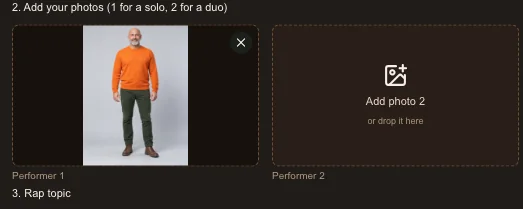
Add one photo to rap solo or two to trade lines with a friend; Hotel Lobby needs exactly two. The first box is the person on the left and the second box the person on the right. If you fill only one box, that photo is used for a solo.
- One adult per photo, with the face clearly visible and roughly facing the camera.
- Even light, no sunglasses, masks or heavy filters.
- Waist-up or full-body photos help the AI keep your outfit.
- JPG, PNG or WebP. Large photos are resized in your browser before upload.
Step 3: Write the rap topic
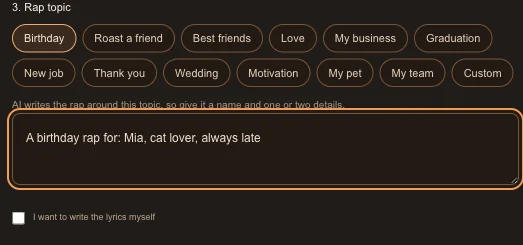
The topic is required: the AI writes the whole rap around it, so it is what keeps the song on track. Tap a quick start such as Birthday, Roast a friend or Thank you to fill in the opening, then add a name and one or two specific details.
- A birthday rap for: Mia, cat lover, always late, karaoke queen
- Roast my friend: Leo, always on his phone, cannot park
- A thank-you rap for: Mom, always cooking, my number one fan
Want your own words? Tick "I want to write the lyrics myself" and paste them. Keep lines short, about two lines per 5 seconds; the form estimates whether they fit and offers a longer video if they do not.
The rap language follows what you type: Chinese text gives a Mandarin rap and Portuguese text a Portuguese rap; otherwise it is English. You can change it in Settings.
Step 4: Check the settings and the cost
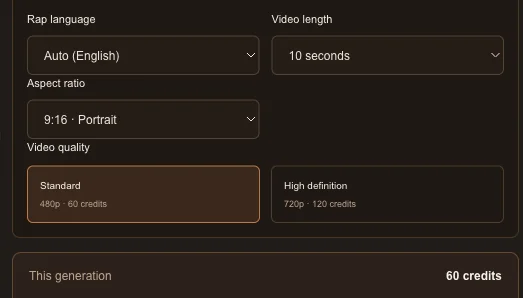
Open Settings to choose the length (5, 10 or 15 seconds), the shape (9:16, 16:9 or 1:1) and the quality. The cost box above the button updates as you change them.
| Video | 480p | 720p |
|---|---|---|
| 5 seconds | 30 credits | 60 credits |
| 10 seconds | 60 credits | 120 credits |
| 15 seconds | 90 credits | 180 credits |
| Hotel Lobby (15 seconds) | 50 credits | 100 credits |
Changing the shape does not change the price. 9:16 is the default and fits TikTok, Reels and Shorts.
Step 5: Create and wait
Press create. If you are not signed in, you are asked to sign in first. Before anything is generated, the full prompt passes an automated content check; then your photos are uploaded and the credits are reserved.
In our tests a video took about 2 to 5 minutes. You can close the page: the video keeps rendering and appears in My videos when it is ready. If it fails, the credits return to your balance automatically.
Step 6: Download and post
Open My videos, play the result and download the MP4. It has no watermark, so you can post it as it is or add captions in your favourite editing app.
TikTok and Instagram ask creators to label realistic AI-generated video. Turn on the AI label when you post.
How much does an AI rap video cost?
Credits come in one-time packs with no subscription: 60 credits for $9.99, 100 for $12.99, 200 for $22.99 and 300 for $32.99. The 60-credit pack makes one 10-second original rap or one Hotel Lobby video at 480p, and bigger packs cost less per video. The exact cost is always shown before you create.
Fixing common problems
- It does not look like me: use a sharper, front-facing photo with even light and no sunglasses; a waist-up photo also keeps your outfit.
- The rap went off-topic: make the topic more specific, with a name and one or two concrete details, or write the lyrics yourself.
- The lyrics were cut off: shorten them or choose a longer video; the form warns you when they will not fit.
- The background is not what I expected: pick Your own stage and describe the place.
- The video failed: the credits come back automatically. Try again, or try a different photo.